Elevate Your UI with PrimeReact: A Comprehensive Guide
Elevate Your UI with PrimeReact: A Comprehensive Guide
Introduction
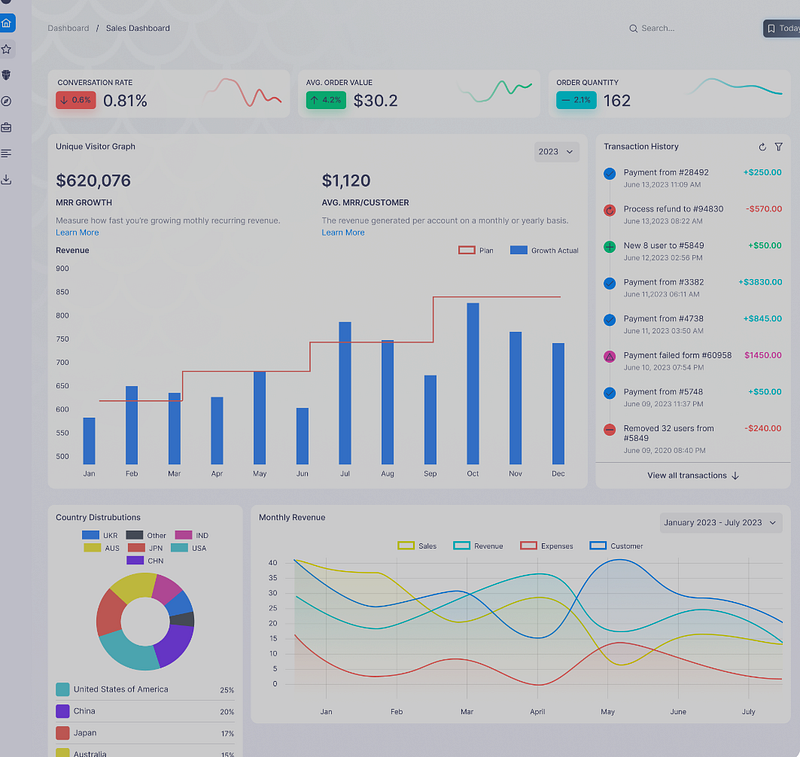
In the fast-paced world of web development, delivering a polished and responsive user interface (UI) is essential. React developers often face the challenge of building complex UIs efficiently without compromising on quality or performance. This is where PrimeReact steps in as a game-changer. PrimeReact is a rich UI component library that provides an extensive set of tools to create stunning and highly interactive user interfaces. In this blog, we’ll explore what makes PrimeReact a must-have for React developers and walk through some practical examples to get you started.
What is PrimeReact?
PrimeReact is an open-source UI component library for React, created by PrimeTek Informatics. It’s part of the Prime family of libraries, which also includes PrimeFaces for Java and PrimeNG for Angular. PrimeReact offers a wide array of components, ranging from simple buttons to complex data tables and charts. The library is designed to be highly customizable, making it easier for developers to match the UI components to their application’s branding and design requirements.
Key Features of PrimeReact
- Extensive Component Collection: PrimeReact provides over 80 components, including buttons, inputs, dialogs, data tables, charts, and more. Each component is meticulously designed to ensure it’s feature-rich and easy to use.
- Theming Support: With PrimeReact, you can choose from a variety of themes or create your own custom theme using the PrimeReact Theme Designer. This flexibility ensures that your UI aligns with your brand’s identity.
- Responsive and Mobile-Friendly: PrimeReact components are designed to be responsive, ensuring that your application looks great on both desktop and mobile devices.
- Enterprise-Grade: PrimeReact is built with performance and scalability in mind, making it suitable for large-scale enterprise applications.
- Rich Documentation and Community Support: PrimeReact comes with comprehensive documentation and a thriving community, making it easier for developers to get started and find support when needed.
Getting Started with PrimeReact
Step 1: Install PrimeReact
To get started with PrimeReact, you need to install the library along with PrimeIcons (for icons) and PrimeFlex (for utility CSS classes). Use the following command:
npm install primereact primeicons primeflexStep 2: Basic Usage
Let’s create a simple UI using PrimeReact components. First, import the required components in your React application:
import React from 'react';
import { Button } from 'primereact/button';
import { InputText } from 'primereact/inputtext';
import 'primereact/resources/themes/saga-blue/theme.css';  // Theme
import 'primereact/resources/primereact.min.css';          // Core CSS
import 'primeicons/primeicons.css';                        // Icons
Step 3: Creating a Simple Form
Now, let’s build a simple form with a text input and a submit button:
function App() {
    return (
        <div className="p-d-flex p-jc-center p-ai-center p-flex-column">
            <h2>Simple Contact Form</h2>
            <div className="p-field p-grid">
                <label htmlFor="name" className="p-col-fixed" style={{ width: '100px' }}>Name</label>
                <div className="p-col">
                    <InputText id="name" type="text" placeholder="Enter your name" />
                </div>
            </div>
            <Button label="Submit" icon="pi pi-check" />
        </div>
    );
}

export default App;
In this example, we’ve used the InputText and Button components from PrimeReact to create a simple contact form. The p-d-flex, p-jc-center, and p-ai-center classes come from PrimeFlex and help in styling the form layout.
Advanced Component Example: DataTable
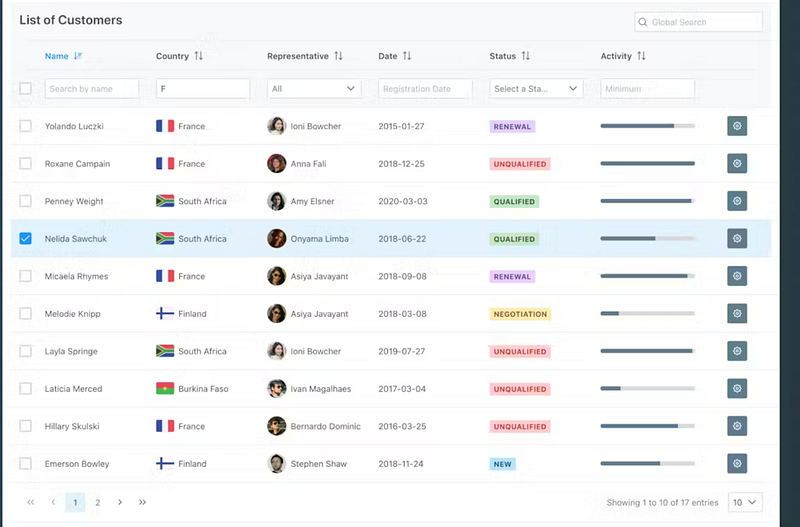
One of the standout components in PrimeReact is the DataTable. It’s highly customizable and can handle large datasets with ease.
import React, { useState, useEffect } from 'react';
import { DataTable } from 'primereact/datatable';
import { Column } from 'primereact/column';
import axios from 'axios';

function App() {
    const [customers, setCustomers] = useState([]);

    useEffect(() => {
        axios.get('https://api.example.com/customers')
            .then(response => setCustomers(response.data))
            .catch(error => console.error('Error fetching data:', error));
    }, []);

    return (
        <div>
            <h2>Customer Data</h2>
            <DataTable value={customers}>
                <Column field="id" header="ID" />
                <Column field="name" header="Name" />
                <Column field="email" header="Email" />
                <Column field="phone" header="Phone" />
            </DataTable>
        </div>
    );
}

export default App;
In this example, we fetch customer data from an API and display it in a DataTable. The DataTable component supports features like sorting, pagination, and filtering out-of-the-box.
Custom Theming with PrimeReact
PrimeReact allows you to create a custom theme using the PrimeReact Theme Designer, which can be downloaded and integrated into your project. This is particularly useful for maintaining consistency across your application’s UI components.
To use a custom theme, download it from the PrimeReact Theme Designer and include the theme’s CSS file in your project:
import 'path-to-custom-theme/theme.css';Why Choose PrimeReact?
PrimeReact stands out because it not only provides a rich set of UI components but also ensures they are easy to use, highly customizable, and built for performance. Whether you’re building a small project or a large-scale enterprise application, PrimeReact gives you the tools you need to create a professional, responsive, and accessible user interface.
Conclusion
PrimeReact is a robust, versatile, and feature-rich UI component library that can significantly enhance the productivity of React developers. Its extensive collection of components, coupled with theming support and responsive design, makes it a go-to solution for building modern web applications. If you haven’t already, give PrimeReact a try in your next project and experience the difference it can make.


